
WordPress Management
DropLink
Turn your WooCommerce store into the center of your own dropshipping network. Give each retailer an approved catalog and private prices; they sell in their stores, start supplier payments from their dashboard and follow every order through delivery. Supplier and Retailer plugins included.
Annual license for one supplier store. DropLink Retailer is included and needs no local license. One-time payment, no automatic renewal.
Discover DropLink
DROPLINK · YOUR DROPSHIPPING NETWORK
Turn your WooCommerce store into a dropshipping supplier.
Your products. Your prices. Your retailers. DropLink connects independent WooCommerce stores to your catalog, so you can build and run your own retail network from the store you already own.
Supplier-led network · Private retailer pricing · Connected fulfillment
A network you control, not another product feed to babysit.
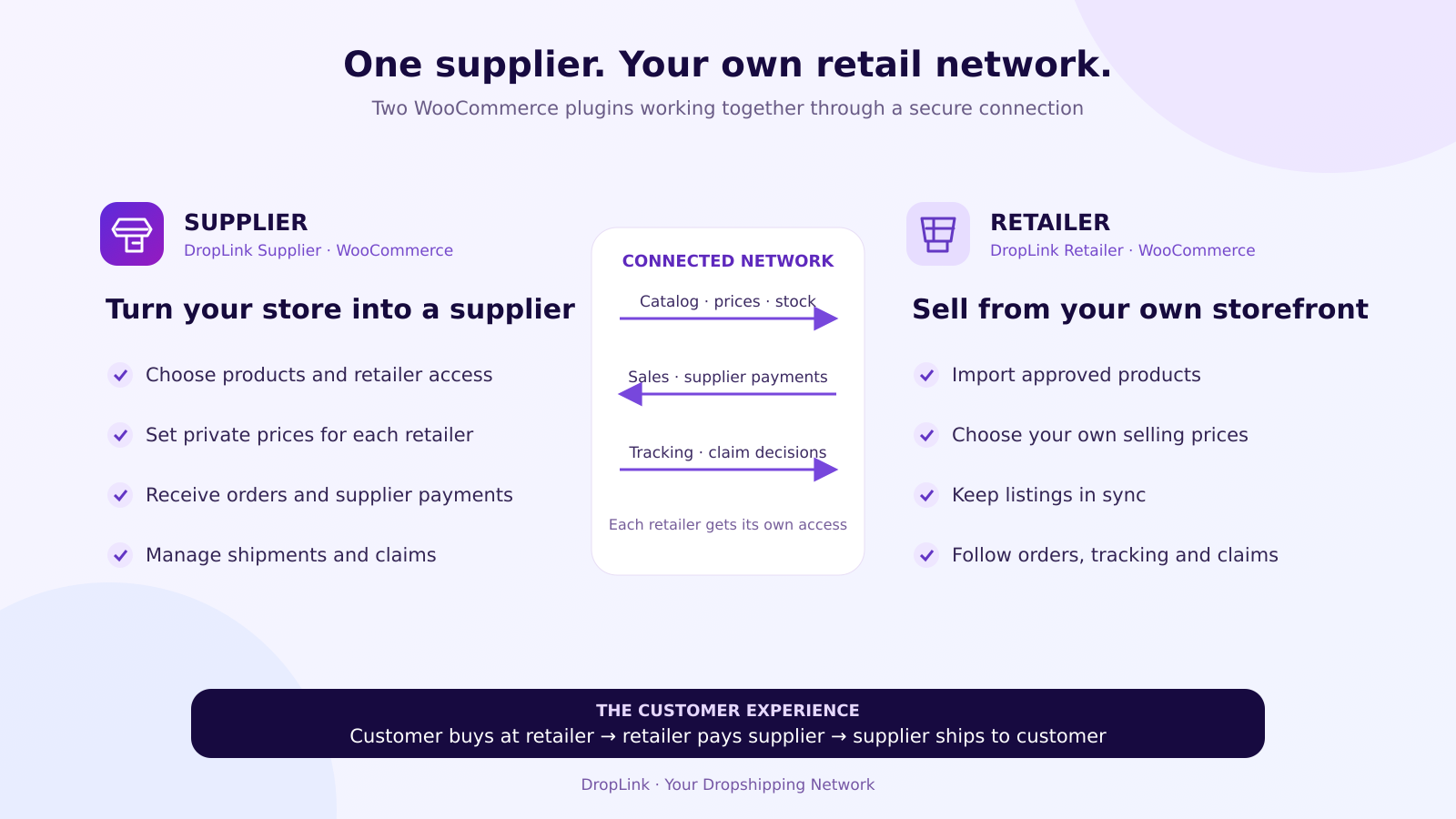
Most dropshipping workflows start at the retailer’s checkout. DropLink starts at your supplier store. You decide which connected retailer may sell each part of your catalog and what supplier price they receive. The retailer imports approved products into its own WooCommerce store, sets its selling prices, and serves its customers.
The relationship continues after the sale: supplier payment, order details, shipping updates, tracking and claims have dedicated workspaces on both sides.
WHAT SETS DROPLINK APART
Built for suppliers who want their own retail network.
01 · Retailer-by-retailer access
Choose the categories and tags each retailer can sell. Products outside its selection are unpublished on the retailer’s next sync. Pause a connection without revoking its key.
02 · Prices made for each partner
Set a private product price or percentage off / percentage more rules for a retailer. Your public WooCommerce prices remain untouched; retailers set their own selling prices.
03 · Two connected workspaces
Supplier and retailer each have a dedicated plugin. Share approved catalog items and stock updates; see retailer sales, supplier payments and fulfillment in the right place.
04 · After the order, too
Manage shipment status and tracking, send a visual update to the customer, and discuss returns and claims with a readable message history.
From your catalog to your customer’s doorstep
- Install Supplier in your WooCommerce store and activate your license.
- Invite retailers with a connection key and approve their stores.
- Set product access and private supplier prices for each retailer.
- Retailers import approved products and choose their selling prices. Manual and scheduled sync refresh linked listings.
- When a customer orders from a retailer, the retailer pays the supplier; the supplier handles the shipment and shares tracking.
A SALE, STEP BY STEP
A customer pays the retailer. The retailer pays you.
Those are two separate transactions, and DropLink makes the distinction visible. When a customer pays for a linked product in the retailer’s store, the sale appears in My sales with its supplier payment status. The retailer can start payment for that sale or pay several outstanding supplier sales together from the plugin panel. The secure checkout opens on your supplier store in a separate tab; when payment is confirmed, both sides see the updated status.
From the supplier workspace, you see the paid retail sale, open the shipping address, prepare the parcel and add tracking. The retailer follows the shipment and can email a clear delivery update to the customer. This gives both businesses a shared order trail while each keeps its own WooCommerce store.
A growing catalog, processed in batches.
DropLink does not set a fixed limit on linked products. Import and scheduled updates process products in smaller batches. The real capacity of a large catalog depends on your hosting, database and cron performance; plan server resources for your expected volume of products and connected retailers.
Two plugins. One annual supplier license.
Your purchase includes DropLink Supplier for the supplier store and DropLink Retailer for connected retail stores. The license activates on one supplier site; Retailer does not need a separate local license. WooCommerce is required on both stores.
$89 per year · one-time payment · no automatic renewal
Scheduled sync needs a working WordPress cron runner. Returns & Claims records decisions and agreed amounts; actual supplier transfers and customer refunds must be made separately through WooCommerce or the relevant payment provider.
Make your catalog available on your terms.
Connect your retailers, protect your pricing, and keep the entire dropshipping relationship in view.
What you can do with this plugin
From the supplier catalog to the last delivery update: each store has its own tools, and both stay connected.
Build your own retail network
Create a connection for every retailer, approve enrollment, and see which stores are active, when they last synced and how many products they have linked. Pause access without revoking the connection key.
Choose what each partner may sell
Approve different categories and tags for each retailer. Reserve parts of your catalog for selected partners; products that lose authorization become drafts at the next sync, without touching the retailer’s own products.
Set private prices and partner offers
Define product-specific prices for each retailer, or apply percentage discounts or markups across the catalog and categories. Your public prices stay unchanged; retailers see their supplier cost and decide their own selling price.
Let retailers choose what to import
Retailers browse their approved catalog, search, filter and import individual products or categories, including compatible variations. They can apply their own selling-price rules before listing products.
Refresh listings in manageable batches
Price, stock and availability changes can be checked manually or through scheduled sync. Work runs in batches instead of one heavy request, and the retailer sees the next scheduled check.
Turn customer sales into supplier payments
A customer buys and pays at the retailer’s store. DropLink tracks that payment separately from what the retailer owes the supplier. From My sales, the retailer starts payment for one sale or several together. A secure supplier checkout opens in another tab, and both panels reflect the confirmed payment.
Follow the order through delivery
After supplier payment, review the order and delivery address. Add the carrier, tracking number, status and estimated delivery; retailers receive shipment updates and can send a visual tracking email to customers.
Handle claims with a shared history
Retailers submit returns or claims with photos; suppliers respond and record a decision or agreed amount. Both sides see the newest message first. An agreed amount is a record; actual transfers and refunds are handled separately.
Requirements and compatibility
WordPress 6.5 or later, PHP 7.4 or later, and WooCommerce on both supplier and retailer stores. HTTPS connections and a reliable WordPress cron runner for scheduled synchronization. DropLink does not impose a fixed linked-product limit and syncs in batches; actual capacity and speed depend on server resources. Large catalogs or many retailers need hosting with sufficient CPU, memory, database capacity and cron performance.